
Jailbreak vs Root: What is the Difference?


Learn the difference between jailbreak android phone and rooting. Explore risks, benefits, and how redrocksgeek makes safe rooted devices simple.
ailbreak vs Root: What Is the Difference?
If you’ve looked into ways to unlock more control on your phone, you’ve likely seen the terms jailbreak android phone and “rooting.” To many people, they sound like the same thing. They both promise more freedom, more customization, and more control over your mobile device. But the truth is that the two methods are very different especially if you’re an Android user trying to understand what’s safe, what’s risky, and what actually works in real life.
At REDROCKSGEEK, we meet thousands of players and tech curious Android owners who want more control but feel nervous about making the wrong move. Some worry that changing system files will break their phone.
Others are concerned that making changes to their phone could void your warranty or stop important apps like banking apps or streaming services from opening. Many also feel confused by all the warnings about security risks and the fear of losing access to the Google Play Store.
So in this article, we’re going to break everything down clearly and simply. In this guide, you’ll learn what it really means to root an Android device, what jailbreaking is, how they differ, why people try them, the risks of each, and why REDROCKSGEEK’s pre rooted phones offer a safer, hassle free way to enjoy complete control.
In this guide, we employ simple, everyday language without technical jargon, enabling you to comprehend these terms and make informed decisions about your phone and its usage.
What Does It Mean to Root or Jailbreak a Phone?
Most people first hear about jailbreaking from friends who use iPhones, while rooting is more common among Android users. Although both methods remove restrictions set by the manufacturer, they are not interchangeable.
Let’s make the difference simple.
Related articles:
Rooting an Android Device
To “root” a phone means to unlock full permissions inside the Android operating system. Android uses a Linux based structure, and rooting gives you the highest level of access. Once you root your phone, you can:
- Access or modify hidden system files
- Delete apps the manufacturer installed
- Customize settings that normal users can’t reach
- Install apps that require advanced permissions
This is why rooting is popular among gamers, developers, and people who love customizing their phones.
Rooting can be complicated. Rooting isn’t straightforward. It usually involves downloading unofficial tools, unlocking the bootloader, doing a factory reset, and hoping the phone doesn’t end up stuck in a boot loop. That process is why many people prefer a pre rooted phone from REDROCKSGEEK it’s ready from the moment you turn it on.
Jailbreaking Your Phone
Although many people say jailbreak android phone, the term “jailbreaking” actually applies mostly to Apple’s iOS devices.
Jailbreaking lets iPhone users avoid Apple’s restrictions. It lets them install apps from outside the App Store, change the interface, or modify the system in ways Apple usually doesn’t allow.
Android doesn’t need a “jailbreak,” because it’s already more open. You can already download and install apps from outside the Google Play Store with a simple toggle. Rooting, not jailbreaking, is the true method of unlocking full control on Android.
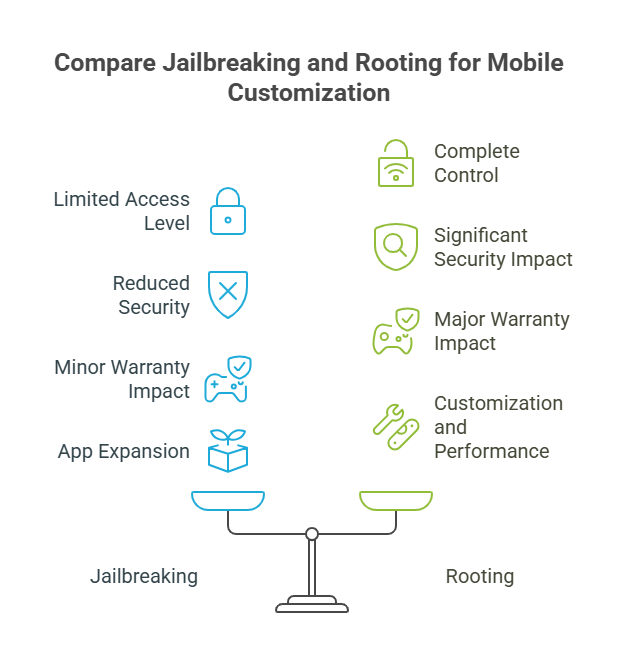
Table: Key Differences in Jailbreak vs Root
| Feature / Concept | Jailbreaking (iOS) | Rooting (Android) |
|---|---|---|
| Operating System | iOS devices | Android operating system |
| Access Level | Medium system access | Deep system files access |
| App Store Limitations | Removes App Store restrictions | Already flexible; no jailbreak needed |
| Tools Required | iOS-specific jailbreak tools | Bootloader unlock + root tools |
| Customization Level | Moderate | Complete control |
| Affects Warranty | Often yes | Can void your warranty |
| Security Impact | Can weaken iOS protections | Can introduce security risks |
Why Android Users Choose Rooting
If rooting seems risky, why do so many people still want it? The answer comes down to two things:
- Freedom
- Control
In a world where technology often locks us out of our own devices, rooting feels like taking your power back.
Here are the real reasons people root their phones especially gamers, enthusiasts, and people tired of bloated software.
1. Remove Bloatware
No one likes opening a new phone and seeing 15 apps they will never use. Manufacturers preload apps you cannot delete unless you root the phone. Rooting lets you remove bloatware and free up space and performance.
2. Install Apps That Require Deeper Access
Some apps simply need more permissions than a normal phone allows. With root access, you can install apps that change how your device works, automate tasks, or improve gaming performance.
3. Complete Control of the Device
You can control everything from performance tweaks to battery optimization to custom themes. Rooting a device becomes a way to shape your phone exactly how you want.
4. Explore More Advanced Features
Rooting enables customization tools, emulator support, special spoofing apps, and system level modifications not available to normal users.
Top Reasons People Want to Jailbreak Android Phone
- Gain complete control
- Custom modify the android operating system
- Install apps outside normal permissions
- Remove unwanted software
- Speed up devices running older versions
- Improve battery life
- Access advanced gaming tools
- Modify system files for power user features
Many people use the phrase jailbreak android phone, but rooting actually unlocks full Android freedom.
Understanding the Risks What Manufacturers Don’t Tell You
Understanding rooting goes beyond just knowing what you gain. It also changes how your device interacts with security, updates, and official services.
Let’s look at the real risks in a clear, human way.
1. Security Risks
Root access means removing your phone’s built in security layers. On a normal Android device, the system blocks harmful apps before they reach critical system files. But when you root:
- Malicious apps can gain deeper access
- Your system becomes easier to compromise
- Mistakes can break essential functions
This is why banking apps often refuse to open on rooted phones they detect the risk and shut down to protect your money.
2. Warranty Concerns
Rooting can void your warranty, depending on the manufacturer. This is especially true for Samsung devices, where Knox security flags any modification and permanently disables certain features.
3. Operating System Stability
Rooting can cause issues like:
- Boot loops
- Failed updates
- Random crashes
- Apps refusing to work
- Broken permissions
If something goes wrong, you may need a factory reset, losing data and settings.
4. App Restrictions
Many important apps including government apps, payment tools, and banking platforms detect rooting and block access.
And this is where REDROCKSGEEK steps in. Rather than dealing with risky DIY tools, users opt for pre-rooted phones that are stable, safe, and built to perform over time.
A Safer Option Pre Rooted Devices from REDROCKSGEEK
One of the biggest challenges people face when learning about rooting is fear. They worry about breaking their phone, exposing themselves to security risks, or losing important apps.
That’s why REDROCKSGEEK created a safer, smoother alternative.
Why Our Pre Rooted Phones Are Different
When you buy a rooted device from REDROCKSGEEK, everything is already configured:
- The system is stable.
- Root access works properly.
- We pre test all spoofing and customization tools.
- We configure critical apps to avoid detection issues.
- We optimize the phone for performance and battery life.
Instead of hunting for guides or juggling risky downloads, you simply turn the phone on, open your apps, and enjoy complete freedom.
Devices Running the Best Configuration
We pick the best Android operating system builds for our rooted phones so they stay fully functional and let you enjoy advanced features. You avoid the typical problems people face when rooting an android device for the first time.
Why This Matters
You’re not just unlocking the potential of your device you’re doing it safely.
Whether it’s customizing settings, removing bloatware, improving performance, or enhancing gaming, REDROCKSGEEK devices provide the advantages of rooting safely and easily.
FAQ: Jailbreak vs Root
1. Is it possible to jailbreak android phone devices?
In reality, Android doesn’t have a process called “jailbreaking.” Android uses the term rooting, as it already lets users install apps from outside the Google Play Store without jailbreaking.
2. Is rooting an android device legal?
Rooting is legal, but it may void your warranty and can block access to important apps, especially banking apps.
3. What are the main differences between Jailbreak vs Root?
Jailbreaking is for iOS and modifies restrictions from the App Store. Rooting modifies the android operating system to unlock deeper system files and permissions.
4. Does rooting increase security risks?
Yes. Removing built-in protection means your device becomes more vulnerable. REDROCKSGEEK minimizes these risks with a pre tested, stable configuration.
5. Can a factory reset remove root?
Not always. Some rooting methods survive a factory reset, depending on how deep the root modifications went.
Conclusion: Rooting Offers Freedom Safely, When Done Right
Understanding the difference between jailbreak android phone and rooting helps you make smart choices with your mobile device. Jailbreaking belongs to iOS users, while rooting gives Android lovers true freedom. Yet with freedom comes risk, especially when you modify core system files or choose unstable rooting tools.
The safest path is simple: trust a device that’s already prepared by experts.
At REDROCKSGEEK, every pre rooted phone is tested for stability, optimized for performance, and carefully configured to avoid the headaches most people face when rooting an android device by themselves.