
Security Best Practices for Rooted Android Devices


Learn the best security practices for Rooted Android Devices. Protect your rooted phone, manage risks, and keep your device safe with redrocksgeek.
Security Best Practices for Rooted Android Devices
Many Android users share a familiar moment as they stare at a phone that feels too limited. Your phone slows down over time, accumulates pre installed apps you never use, and misses the features you need. Rooting a device often begins with that spark the desire to take full control of your technology. Unlocking the full potential of Rooted Android Devices makes your phone flexible, customizable, and easy to make your own.
Yet with that freedom comes responsibility. A Rooted Android provides powerful features and access to areas usually locked for your protection. That’s why learning the best security practices isn’t just helpful it’s essential.
At redrocksgeek, we work with rooted phone users every day. The users who care for their devices from the start become the most confident and long lasting.
This guide walks you through everything you need to know to keep your rooted phone safe, functional, and enjoyable. Practical advice in this guide works whether you root your phone yourself or select a responsibly prepared device from our Rooted Phones Collection.
Related articles:
Understanding Rooted Android Devices
Before diving into security, it helps to understand exactly what rooting a device changes. Rooting gives you administrative access, the same level of control that manufacturers and carriers normally keep for themselves. After beginning the rooting process, you can install custom software, remove pre installed apps, and adjust system files that standard Android devices protect.
Rooting generally starts with unlocking the bootloader, which gives you permission to run unofficial software on the phone. Many users then install a custom recovery a tool that lets you back up your device, flash new firmware, or perform a factory reset more safely. From there, a rooting method like Magisk or similar tools can give you full control over your system.
There are good reasons people choose this path. Some want better performance on older devices. Others want advanced personalization options or the ability to remove manufacturer bloatware. And some users simply want the freedom to manage their phone their own way.
Still, it’s important to remember that rooting affects areas that manufacturers and carriers carefully secure. It may void warranties, break certain features, or make the device more vulnerable if handled carelessly. That doesn’t mean rooted phones are dangerous only that they require good habits, which we’ll explore in the next sections.
Even at this early stage, one thing becomes clear: understanding how your rooted phone works is the first step to keeping it secure.
Security Risks and How to Manage Them
Rooting gives you the power to modify system files, but it also creates new security risks if you are not careful. Most users avoid major issues, but understanding potential challenges and how to prevent them is still important.
One common risk is that a rooted device can accidentally grant high level permissions to unsafe apps. On unrooted phones, Android creates strict boundaries to protect sensitive areas. Rooting relaxes those boundaries, which means users must be deliberate about the apps they install.
Another concern is security patches. Manufacturers regularly release updates that fix vulnerabilities. After you modify the device, security patches may not install automatically, especially on custom ROMs or older devices. That’s why many rooted Android users rely on manual updates or community-supported firmware.
Unmanaged background processes can cause battery life to drop on rooted phones. Removing certain pre installed apps can cause your phone to behave unexpectedly if you modify the wrong files.
Finally, different manufacturers and carriers respond differently to rooting. Some devices handle modifications gracefully, while others may have more sensitive firmware that reacts unpredictably.
Despite these risks, rooted phones remain secure when cared for properly. The key is learning how to manage these potential issues something we’ll cover in detail in the next section.
Common Security Risks & Safe Practices for Rooted Android Devices
| Risk on Rooted Android Devices | Why It Happens | Safe Practice to Reduce Risk |
|---|---|---|
| Exposure of system files | Root access removes built in restrictions | Limit root permissions to trusted apps |
| Missing security patches | Custom ROMs or modified firmware | Apply manual updates and use active developer communities |
| Unstable battery life | Background apps gain expanded access | Manage permissions and avoid unnecessary root apps |
| Voided warranties | Manufacturer and carrier restrictions | Learn warranty policies before rooting |
| App conflicts or crashes | Removed pre installed apps or modified files | Research system files before changes and keep backups |
Best Practices to Secure a Rooted Phone
Now that we understand the risks, let’s focus on building strong security habits to protect your device. These habits keep your phone stable and reliable, no matter how you choose to customize it.
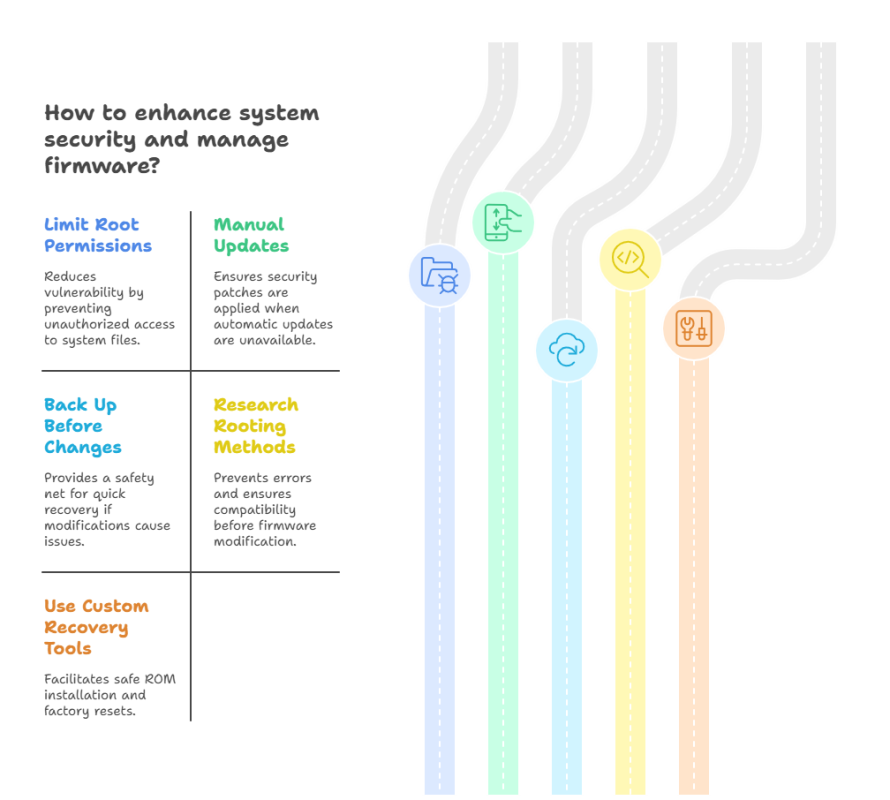
First, be mindful of what apps receive root access. Not every app needs system-level permissions, and granting unnecessary access increases vulnerability. Many seasoned users treat root permissions like giving someone a key to their home only trusted, well-understood apps should have that kind of control.
Second, always maintain backups before making changes to system files or installing custom ROMs. A custom recovery makes this easy by letting you create full images of your device. If something goes wrong, you can restore everything without losing your data.
Third, be selective about the rooting method and ROMs you use. Some rooting methods are safer, while others might modify sensitive areas of the system. Choose custom ROMs that offer stability and receive regular security patches if you decide to install them.
Fourth, build a habit of checking for updates manually. Many rooted Android devices miss automatic updates from the manufacturer, so monitor firmware and security patch releases regularly.
Finally, prepare a safety plan for factory resets. Rooted phones sometimes require special steps to maintain root after a reset, and custom recovery tools make the process smoother.
These simple habits create a strong foundation for secure, long lasting use of your rooted phone.
Best Security Habits for Your Rooted Android
- Use root access only when necessary
- Keep a complete backup before major changes
- Update your custom ROM or firmware regularly
- Limit apps that can modify system files
- Research rooting methods before installation
- Use a trusted custom recovery
- Maintain battery life by removing unnecessary background apps
- Perform a safe factory reset when needed
- Track security patches for your Android device
When a Rooted Android Is Worth It
Security doesn’t exist in a vacuum it’s part of a bigger story about how you use your device. In many ways, a rooted phone is most valuable when it empowers you to do more with technology you already own.
Rooting can revive older devices by removing heavy pre installed apps or improving battery life with more efficient software. Advanced users appreciate the deeper personalization options, from interface themes to enhanced performance tools. For some, rooting isn’t just a tweak it’s a way of making an Android device feel truly personal.
And at redrocksgeek, we see many users who want the power of rooting without the anxiety of doing it themselves. Our [Rooted Phones Collection] features devices prepared with care, tested for stability, and designed to make safe customization easy.
At redrocksgeek, we see many users who want the benefits of rooting without the stress of doing it themselves. The freedom of a rooted phone is most rewarding when paired with smart, simple safety habits.
Security Best Practices for Rooted Android Devices
1. Can following best practices ensure the security of Rooted Android Devices?
Yes as long as you follow proper safety habits. Rooted Android Devices demand extra caution since apps can access system files. Using backups, managing app permissions carefully, and installing updates keeps them safe and reliable.
2. What security risks arise from rooting a device?
Rooting a device lowers certain protections by granting administrative access. Modifying unsafe apps or files can introduce security risks. Solid habits and trusted tools help prevent these issues.
3. Can rooted phones receive and install security patches effectively?
Some devices stop receiving automatic patches after the rooting process. Many users update manually through custom ROMs or community-supported firmware to stay secure.
4. Can rooting improve battery performance on older devices?
Yes. Many users root their devices to remove heavy pre installed apps and improve battery life with custom settings.
5. How does performing a factory reset affect a rooted phone?
You can still perform a factory reset, especially with a custom recovery installed. Ensure you have a backup available to restore your rooted configuration later on.
Safe Rooting Habits for Rooted Android Devices
Conclusion
A rooted phone opens the door to a world of customization, power, and control. Understanding how to root and maintain your device lets you turn a rooted phone into a device shaped to your needs. By protecting system files and applying security patches, you can keep your rooted Android safe and reliable for years.
We at redrocksgeek have seen how rooted devices help users revive older phones, gain advanced features, and experience smoother Android performance. Mastering your Android device is key, whether you root it independently or select a pre-rooted phone from our Rooted Phones Collection.
Interested in exploring rooted phones or having a device configured by experts? Check out our Rooted Phones Collection. It’s an easy method to experience the complete benefits of rooting with assurance and safety.