
Rooted Devices: Benefits & Security Risks


Learn about rooted devices, their benefits, and security risks. Keep your data safe while enjoying more control with Rooted Phones Collection.
Introduction
With root access, you can manage all aspects of your Android device, from apps to system settings. Root access allows you to customize themes, install advanced applications, improve performance, and access features normally restricted.
Sounds exciting, right? But here’s the catch this freedom comes with some security risks. Hackers could access your data, apps might misbehave, and you could lose important information if you’re not careful.
Rooted devices are phones that allow root access the highest level of control on an Android device. This access enables features and functions that are not available on standard Android devices. For gamers, technology enthusiasts, and business users, this provides significant advantages. But it also means you need to understand the risks and how to protect yourself.
At RedrocksGeek, we optimize our pre rooted phones for safety and performance. These devices let you enjoy advanced features without worrying about breaking your phone or losing sensitive data. Knowing the benefits and security risks of rooting is vital for both gamers using advanced apps and professionals using their phones for work.
In this guide, we’ll cover everything you need to know:
- What rooted devices are and how they work
- The main advantages of rooted devices
- The potential cybersecurity risks
- Practical steps to use your device safely
By the end, you will know how to maximize a rooted device’s advantages while safeguarding your data and ensuring strong security.
Related articles:
What Are Rooted Devices & How Does Rooting Work?
Understanding Rooted Devices
A rooted device is an Android phone or tablet that has been modified to give the user root access. Root access means full control over your phone’s system files, settings, and apps. Normally, Android phones limit what users can do for security reasons. Rooting removes some of these limits, which gives you more freedom but it also comes with risks.
For example, you can:
- Remove pre-installed apps that slow down your phone
- Install apps that need root access
- Customize system settings and themes
- Create backups of all your data
But keep in mind: not every app or action is safe. Giving the wrong app root access can let hackers steal sensitive data or even take control of your phone.
How Rooting Works
Rooting is usually done in three steps:
- Unlock the bootloader This allows you to make system changes.
- Install a custom recovery tool This software lets you back up or restore your phone completely.
- Apply root permissions A special app or software gives you full control.
Doing this manually can be risky. If done incorrectly, your phone might stop working, or you could lose your data. That’s why many users prefer pre rooted devices from trusted sources like RedrocksGeek. These phones are tested to make sure they work safely.
Apps That Require Root Access
Certain applications require root access to function properly. These apps can do things like:
- Backup your phone completely (disaster recovery)
- Block ads at a system level
- Automate tasks and improve productivity
- Enhance gaming performance
However, giving untrusted apps root access can lead to unauthorized access, exposing your sensitive data. Users should verify app reviews and ensure updates are current prior to installation.
Table: Features You Can Get with Root Access
| Feature | Benefit | Security Consideration |
|---|---|---|
| Custom ROMs | Personalization & better performance | Download from untrusted sources → malware |
| Advanced Backup | Protect data & disaster recovery | Poor setup → unauthorized access |
| Ad blocking & Automation | Better user experience | Some apps request too many permissions |
| System level Tweaks | Faster performance & memory management | Incorrect tweaks can destabilize the device |
| App Compatibility | Run apps blocked on normal phones | Only use trusted apps |
This table shows that while rooted devices are powerful, they need careful handling to stay safe.
Key Benefits of Rooted Devices
Rooted devices provide many advantages, especially if used wisely. Next, we will examine the primary benefits.
1. Full Control Over Your Device
Root access allows you to modify nearly all aspects of your device. You can:
- Change system themes and user interface
- Remove apps that slow down your phone
- Speed up memory and battery usage
This level of control is not available on normal Android devices.
2. Better Backup & Disaster Recovery
Rooted devices allow complete backups. You can recover every app, setting, and file even if your phone experiences a crash, reset, or is lost. This helps prevent data loss and keeps your business operations running smoothly.
3. Access to Special Apps
Certain apps, like automation tools or advanced gaming apps, need root access. Pre-rooted devices from RedrocksGeek let you use these apps safely. This means you can enjoy advanced features without risking unauthorized access or malware.
4. Enhanced Business Use
Businesses can benefit from rooted devices by installing custom apps that improve workflow. Rooted phones allow:
- Better management of apps and devices
- Stronger security posture with custom protections
- Faster troubleshooting and incident response planning
5. Strong Security (When Configured Correctly)
It might sound strange, but rooted devices can be more secure if used properly. You can:
- Install advanced firewalls
- Encrypt sensitive data
- Monitor apps for unusual activity
With the right setup, rooted phones can combine freedom and safety.
Top Benefits of Rooted Devices:
- Full control with root access
- Advanced backup & disaster recovery
- Access to apps blocked on normal devices
- Supports business operations
- Strong security when managed well
Security Risks of Rooted Devices
While rooting is powerful, it comes with security risks. Understanding these is crucial.
Main Risks
- Higher Cybersecurity Risk Rooting removes Android’s built-in protections. Hackers can exploit this.
- Unauthorized Access Apps or malware can use root access to steal sensitive data.
- Data Loss Mistakes in rooting or app installation can erase important information.
- Weak Security Posture Rooted devices need constant monitoring and updates.
- Impact on Business Continuity Businesses relying on rooted devices must have a plan for disaster recovery.
How to Reduce Risks
- Use pre rooted devices from trusted sources like RedrocksGeek
- Install only verified apps that require root access
- Regularly check for app reviews and updates
- Backup your data frequently
- Monitor for unusual activity
By following these steps, rooted devices can be both powerful and safe.
Best Practices for Safe Use
Here’s how to use rooted devices safely:
- Keep Apps and Software Updated Regular reviews and updates fix security holes.
- Limit Root Access Only trusted apps should get root permissions.
- Backup Your Data Protect your sensitive data and enable disaster recovery.
- Monitor Your Phone Watch for unusual activity to prevent hacks.
- Plan for Emergencies Have an incident response plan and prepare for business continuity issues.
RedrocksGeek pre rooted devices follow these practices. You can enjoy all the benefits without worrying about hackers or data loss.
FAQ
1. What is the process of rooting, and what measures ensure its safety?
Root access grants complete control over the phone and is secure when implemented using proper precautions and reliable devices.
2. Can performing root access on a device compromise existing data?
Yes, mistakes can cause data loss, but regular backups and disaster recovery plans help prevent it.
3. What measures should be taken to maintain the security of a rooted device?
Only allow trusted apps root access, update apps regularly, and monitor your phone for unusual activity.
4. Do pre rooted devices provide greater security compared to self rooting?
RedrocksGeek optimizes pre rooted devices for strong security and tests them to minimize risks.
5. How should businesses manage rooted devices to ensure security?
Businesses should use incident response planning, maintain business continuity, and protect sensitive data while benefiting from root access.
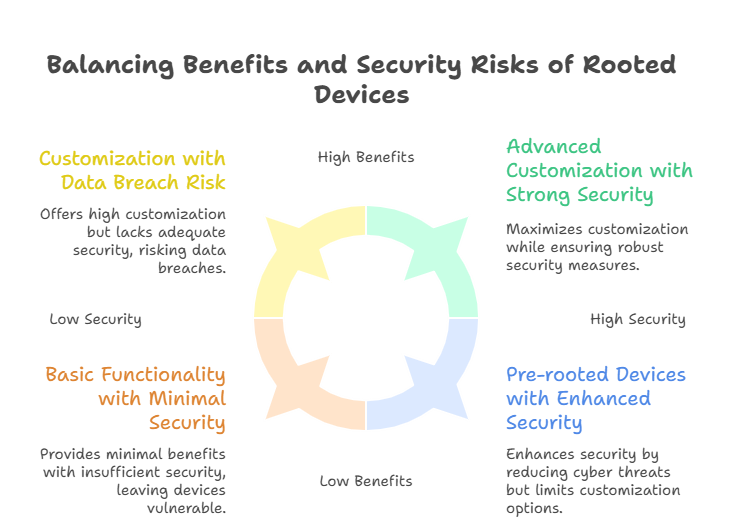
Infographic: Rooted Devices Benefits vs Security Risks
Conclusion
Rooted devices let you unlock your phone’s full potential. You can customize apps, improve performance, and use special apps. But they come with security risks, like cyber threats, data loss, and weaker protections.
Pre rooted devices from RedrocksGeek offer a safe way to enjoy the benefits. Follow best practices: limit root access, update apps, backup data, and monitor activity. This keeps your sensitive data safe while giving you full control of your device.
Explore our Rooted Phones Collection to enjoy advanced features safely and protect your data at the same time.