
What does it mean to have a rooted android phone?

Learn what a rooted android phone means, how root access works, and why many users choose rooted devices on redrocksgeek.
Introduction
Hearing that a phone is rooted, you might agree without understanding the term. Is it risky? Is it illegal? Or is it just one of those tech terms that sounds more complicated than it seems?
In simple words, having a rooted android phone means you have more control over your device than a regular user. Android phones offer flexibility and customization, but they still have limits straight out of the box. Android puts these limits in place to keep you safe, your phone stable, and your data secure.
Rooting removes some of those limits. It lets you explore the system, tweak how things work behind the scenes, and use tools that a standard Android phone doesn’t allow. For some people, this extra freedom feels exciting and empowering. For others, it can sound confusing or even a little scary at first.
That’s completely normal. Rooting has a reputation for being “advanced,” but the idea behind it isn’t as complicated as it sounds. This guide is here to clear things up. You’ll learn what root access is, how to root an Android, the pros and cons, and why so many people are trying it today.
Whether you’re curious or considering a rooted phone, this article explains everything step by step no tech headaches.
Related articles:
What Root Access Actually Means on an Android Phone
To understand rooting, it helps to first look at how a normal android phone works. When you buy a new device, the phone gives you user level access. This means you can download apps, adjust settings, change wallpapers, and personalize your phone in basic ways. However, you still can’t touch important system files or change how the core of the phone works.
Root access changes that. It lets you control the system, kind of like having an admin account on a computer. Root access lets you go beyond the basic settings. You can tweak system files, lift built-in restrictions, and take deeper control of how your phone works.
An easy way to picture this is to think of a regular android phone like a rented apartment. You can decorate it, move furniture around, and live comfortably.
But you can’t knock down walls or change the wiring. A rooted phone is more like owning the building. You decide what stays, what goes, and how everything works.
This is why rooted android devices appeal to users who want more control. Root access allows deeper customization, better control over background processes, and the ability to install tools that need special permissions to work properly. These are things regular android devices simply don’t allow.
Manufacturers lock down android phones for good reasons. Locked systems stop accidental mistakes, keep your data safe, and make sure your phone runs smoothly. Still, for users who want more freedom from their android phone, these limits can feel restrictive.
Rooting an android device removes those locks. It hands control over to you. But with that control comes responsibility. Knowing what root access unlocks is the first step to using it safely and confidently.
How Rooting an Android Device Works
Rooting a phone may sound technical, but the basic idea is actually simple. You are changing how the phone starts up and how it gives permissions, so you can gain root access.
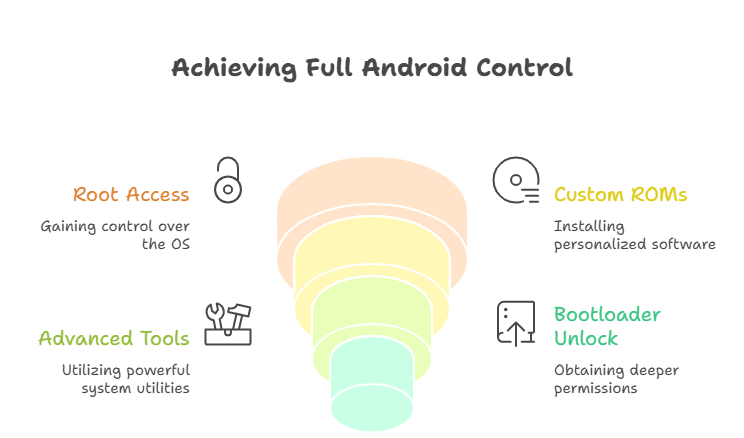
The process usually begins by unlocking the bootloader. The bootloader is the part of the phone that decides what software is allowed to run when the device turns on. By default, it only accepts official software from the manufacturer. When you unlock the bootloader, you give the phone permission to load modified system files.
After that comes the boot image. The boot image controls how Android starts. During rooting, users create a modified version of this file.
You may hear this step described as “select and patch a file.” In simple terms, it just means adjusting the startup process so the phone allows root access while staying stable.
Developer options are also involved. These settings are hidden by default and can be unlocked by tapping the build number several times. Developer options allow advanced changes that are needed during the process of rooting an android device.
Once everything is done correctly, the phone becomes a rooted android phone. It still runs the same Android system, but now you have system level control. You can install custom tools, manage system apps, and decide how your phone works beyond the normal limits set by default.
Table: Rooted vs Non Rooted Android Phones
| Feature | Standard Android Phone | Rooted Android Phone |
|---|---|---|
| System Access | Limited | Full root access |
| Custom ROMs | Not supported | Fully supported |
| App Control | Basic permissions | Advanced system control |
| Customization | Restricted | Deep customization |
| Ideal User | Casual users | Power users & enthusiasts |
Rooting a phone doesn’t change the fact that it’s still an android phone. It simply changes who’s in control the manufacturer, or you.
Why People Choose Rooted Devices
People don’t root their phones just to experiment. They do it because rooted devices offer real, practical benefits that can improve everyday use.
One of the biggest advantages is customization. With root access, you can install custom ROMs that completely change how your android device looks and performs. Custom ROMs can remove unnecessary apps, improve speed, and offer features not available in stock Android.
Battery life is another major reason users choose a rooted phone. Rooting your device allows you to control background processes, manage power hungry apps, and fine tune performance settings. This is especially useful for older devices that may struggle with newer software updates.
Rooted android phones also allow you to install custom tools that require system permissions. These tools can block ads system wide, improve app behavior, and give you insights into how your phone operates behind the scenes.
Top Benefits of Using a Rooted Android Phone
- Full control over your android phone
- Ability to install custom ROMs
- Improved battery life management
- Extended usability for older devices
- Greater flexibility across android devices
For many users, rooting a phone isn’t about breaking rules. It’s about making their device work better for them.
Is Rooting Safe? Security Features, Risks, and Smart Choices
Safety is one of the biggest concerns when people hear about rooting a phone. And honestly, it’s a fair concern. Rooting removes certain security features that are designed to protect the average user.
When you root a device incorrectly, you can expose it to risks such as unstable software, app conflicts, or system errors. That’s why DIY rooting attempts often cause frustration. One wrong step can lead to boot loops or a phone that no longer functions properly.
However, rooting itself isn’t inherently unsafe. The risk comes from how rooting is done. Properly rooted android devices maintain stability while allowing advanced access. The key is controlled rooting not rushed or experimental setups.
Rooted phones can still be secure when users understand what they install and how permissions work. Root access doesn’t force danger; it simply removes restrictions. How you use that freedom matters.
Many users choose pre-configured rooted devices because they want the benefits of rooting without the risks of doing it themselves. These devices are set up carefully so users can enjoy advanced features without sacrificing reliability.
Rooting your device should feel empowering, not stressful. When done right, a rooted android phone remains powerful, stable, and enjoyable to use.
FAQ
What does it mean to have a rooted android phone?
It means your phone has root access, allowing system-level control beyond normal user permissions on an android phone.
Is rooting an android device legal?
Yes. Rooting an android device is legal in most regions. It simply changes how you control your phone.
Does rooting your device damage battery life?
No. Rooting can boost battery life by giving you more control over background apps and system processes.
Can rooted devices still work normally?
Yes. A properly rooted phone functions like any other android phone, with added flexibility and customization options.
Is rooting a phone only for experts?
Not anymore! While it’s still a technical concept, lots of users now choose rooted devices that come ready to use.
Infographic: Rooted Android Phones Explained
Conclusion
So, what does it really mean to have a rooted android phone? At its core, it means freedom. Freedom to customize, optimize, and control your android phone in ways that aren’t possible with standard settings.
Rooting a phone isn’t about breaking the system. It’s about understanding it and using it to its full potential. Whether it’s improving battery life, extending the usability of older devices, or installing custom ROMs, rooted devices offer real advantages when handled responsibly.
The key takeaway is this: rooting isn’t for everyone, but for users who want more control, it can completely change how an android device feels and performs. When done correctly, a rooted phone remains stable, secure, and powerful.
If you’re curious about experiencing that level of control without the hassle of doing it yourself, you can explore the Rooted Phones Collection at redrocksgeek and see how a properly configured rooted device can fit naturally into your everyday use.
Rooting doesn’t make your phone complicated. When done right, it makes it truly yours.