
Who Should Root an Android Phone in 2025?

Understand who benefits most from rooting, the risks to consider, and the recommended alternatives for your Android Phone.
Introduction
A few years ago, rooting was something you usually heard about in tech forums or late night YouTube tutorials. Fast forward to 2025, and the conversation has changed dramatically. With Android 16, powerful phones like the Pixel 10 Pro and Galaxy S25 Ultra, and more locked down systems than ever, many everyday users are now asking the same question: Who should actually root an Android Phone today?
Rooting provides users with significant control over their Android Phone. It grants enhanced control of your device, lifts restrictions imposed by manufacturers, and unlocks advanced customization options unavailable to standard users. At the same time, rooting can create real frustration if you jump in without understanding the risks. Some people gain long-term value from root access, while others lose features they didn’t even realize they relied on.
Therefore, the key consideration is not whether rooting is inherently “good” or “bad.” The real consideration is whether rooting aligns with your habits, comfort level, and daily use of your Android Phone. What works perfectly for a gamer or power user may feel overwhelming to someone who just wants things to work.
In this guide, we break everything down in a clear and honest way. In this article, you will learn what rooting involves in 2025, which users gain the most from it, which should avoid it, and how modern solutions, such as pre rooted phones, have transformed the experience. Throughout the article, we’ll keep the language simple, practical, and grounded in real world use.
If you’ve ever wondered whether rooting your Android Phone makes sense or if you’re already halfway through Googling “unlock the bootloader” you’re in the right place.
Related articles:
What Does It Mean to Root an Android Phone in 2025?
When you Root an Android Phone, you gain full control over the operating system. Consider it as moving from a limited user to full control of the device. You’re no longer limited by the rules set by manufacturers, carriers, or pre installed system apps.
Root access allows you to manage system apps and customize how your Android Phone functions. For many users, that level of control is the main reason rooting still matters in 2025.
How Rooting Works Today
In 2025, rooting usually involves several technical steps. While the tools have improved, the process still requires care and patience:
- Enabling OEM unlocking in developer settings
- Using commands like fastboot flashing unlock to unlock the bootloader
- Modifying or patching the boot image
- Installing a method that safely grants root access
Once these steps are completed, you’ve effectively rooted your device. From there, you can remove system apps, tweak performance settings, install custom ROMs, and run apps that need deeper system permissions.
Rooting vs Older Android Versions
Rooting devices running Android 16 differs significantly from rooting older models. Security is tighter, system checks are more advanced, and manufacturers are far more protective of their software.
Companies like Samsung have added extra layers of protection, especially on Samsung Galaxy and Samsung phone models. These safeguards don’t make rooting impossible, but they do make it less forgiving. A single mistake can result in problems that were uncommon in earlier devices.
Many users continue to prefer the Pixel 10 Pro for rooting and experimentation because it offers greater developer accessibility. In contrast, some Samsung devices require additional steps and carry a higher learning curve.
Rooting today is not necessarily more difficult; it requires greater precision. And understanding that difference is what separates a smooth experience from a stressful one.
Table: Rooted vs Non Rooted Android Phone in 2025
| Feature | Rooted Android Phone | Non-Rooted Android Phone |
|---|---|---|
| System control | Full root access | Limited by manufacturer |
| App freedom | Custom ROMs & advanced apps | Play Store only |
| Updates | Manual or custom | Automatic |
| Battery tuning | Advanced control | Basic optimization |
| Risk level | Medium to high | Very low |
Table: Rooted Android Phone vs Standard Android Phone
Who Truly Benefits From Rooting an Android Device?
Rooting serves a functional purpose and is not simply about demonstrating technical ability. At its core, rooting helps solve specific problems and removes limitations that restrict how you use your phone. Rooting can enhance your experience with an Android Phone if you belong to one of the groups below.
Power Users and Tech Enthusiasts
If you enjoy understanding how your android device works under the hood, rooting opens up a level of control that stock phones simply don’t offer. Instead of working around limits, you can shape the phone to match your habits.
With root access, you can:
- Install custom ROMs for a cleaner or faster operating system
- Modify CPU and GPU performance for better speed or efficiency
- Automate system-level tasks that normally aren’t allowed
- Customize the interface far beyond what launchers alone can do
For these users, rooting doesn’t feel risky it feels logical. Rooting transforms the phone into a device configured to meet your specific needs.
Gamers and Location Based App Users
Many users choose to root a device to gain better control over location services, app behavior, and background limits. This is especially common among gamers who rely on consistent performance and precise control.
Rooting helps by:
- Reducing lag caused by background system processes
- Allowing deeper control over GPS behavior
- Creating smoother, more stable setups for long gaming sessions
Instead of juggling unreliable workarounds, rooting gives gamers a cleaner and more dependable solution. For those who play frequently, that stability makes a noticeable difference.
Users With Older Devices
Not everyone upgrades their phone every year, and that’s completely fine. Rooting can breathe new life into older devices that feel slow or outdated on stock software.
With root access, users can:
- Remove heavy system apps that slow performance
- Install lightweight ROMs designed for speed
- Improve battery life by controlling background activity
- Reduce lag and extend daily usability
For phones that no longer receive official updates, rooting can extend their usefulness by years. Instead of replacing the device, many users find that rooting makes it feel fresh again.
List: Top Reasons to Root an Android Phone in 2025
- Full control over your Android Phone and its operating system
- Ability to remove unwanted system apps permanently
- Improved battery life management and power efficiency
- Access to advanced apps that require root access
- Extended lifespan for older devices
- Support for custom ROMs that offer cleaner, faster performance
Who Should NOT Root an Android Phone?
Equally important to identifying who should root is understanding who should not. Rooting is not a shortcut; it carries significant responsibilities.
Everyday Users Who Want Simplicity
If your phone is mainly for calls, messages, banking apps, and social media, rooting may cause more frustration than value. Certain apps may function differently after rooting, even when using concealment tools.
If stability matters more than control, staying stock is often the smarter choice.
Business or Work Managed Devices
Phones tied to corporate policies, secure email systems, or work profiles don’t play well with rooting. Rooting can block access or violate usage terms.
In such situations, rooting may require more time and effort than the benefits justify.
Users New to Android
Rooting requires patience and careful steps. Missing one command like incorrectly unlocking the bootloader can cause data loss or boot issues.
If technical steps already feel stressful, a DIY approach may not be the best starting point.
Rooting in 2025 vs Buying a Pre Rooted Android Phone
This is the point where the discussion becomes particularly important. Rooting in 2025 involves more than just the process; it requires evaluating whether doing it yourself is the most effective approach, which is a critical point to understand. With tighter security, frequent updates, and model-specific limits, many users are rethinking the traditional DIY approach.
The DIY Route
When you choose to root your phone on your own, you take full responsibility for every step of the process. That usually means:
- Researching your exact phone model and software version
- Learning how to unlock the bootloader safely
- Patching the boot image without breaking system checks
- Re-testing everything after system and app updates
For experienced users, this process can be satisfying. It offers full control and a deeper understanding of how the device works. However, it also takes time, patience, and a willingness to troubleshoot issues when something goes wrong. One missed step can lead to bugs, crashes, or features that stop working altogether.
The Pre Rooted Alternative
Many users now choose pre configured phones that are already rooted, optimized, and tested. This option removes much of the stress that comes with manual setup and avoids many of the common mistakes first time users run into.
With a pre rooted phone, you skip the technical steps and start using the features that matter right away. The device is fully configured to run smoothly, giving gamers and location based app users consistent performance with minimal adjustments.
For those seeking the advantages of rooting without navigating complexity, a [Rooted Phones Collection] provides an efficient and dependable option. This approach is practical for users who value time, stability, and ease of use without sacrificing control.
FAQ: Rooting an Android Phone in 2025
Assessing the safety of rooting an Android Phone in 2025?
Rooting can be safe if done correctly, but mistakes increase risk. Security depends on how well the device is configured and maintained.
Is it possible to root Samsung devices running Android 16?
Yes, but Samsung Galaxy models often require more steps and carry stricter security limits compared to Pixel devices.
How does rooting influence battery efficiency on an Android Phone?
It can. With root access, you can control background apps and performance settings more precisely.
What is the proper method to safely reverse rooting on an Android Phone?
In many instances, it is possible. Fully returning to stock depends on your model and the backups you created.
Does rooting offer greater benefits than acquiring a new phone?
For older devices, rooting can be a smart alternative. For newer phones, it depends on your needs and comfort level.
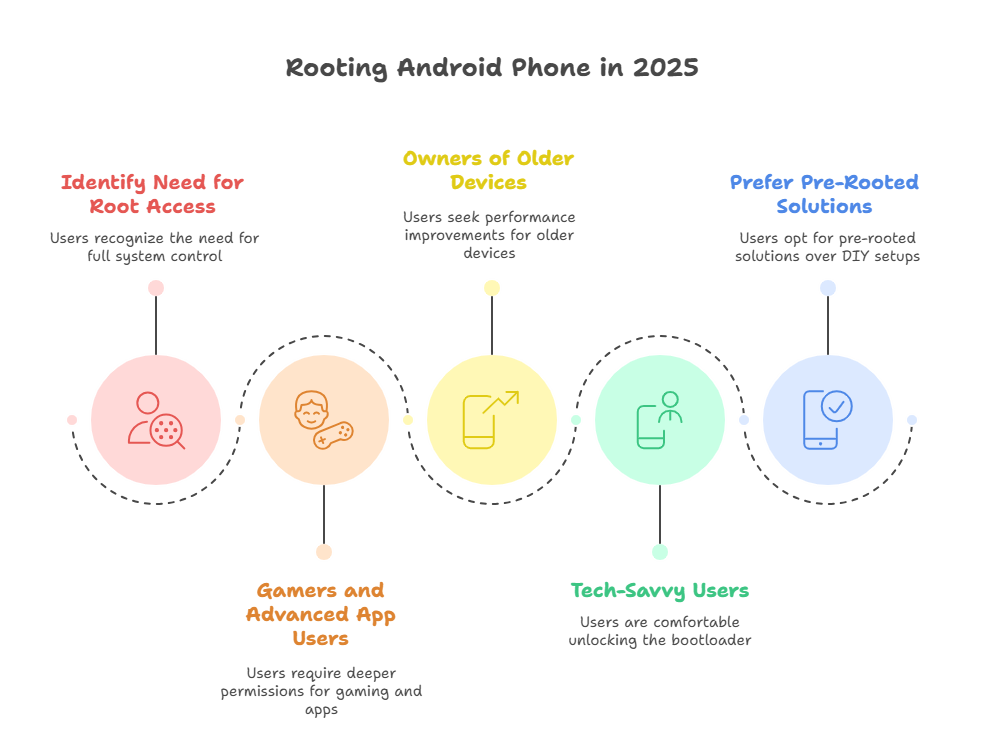
Infographic: Who Should Root an Android Phone in 2025
Conclusion: Rooting Is a Tool Not a Requirement
Rooting is no longer a mark of distinction, nor is it necessary to treat it as such. Today, rooting is simply a tool rather than a status symbol or requirement. The real value of rooting comes from understanding why you want it, not just knowing how to do it.
For users seeking greater control, advanced customization, and extended functionality beyond factory settings, rooting can provide a highly rewarding experience. It gives you the freedom to shape your device around your needs instead of adapting your habits to software limits. For power users, gamers, and technical enthusiasts, this flexibility can significantly transform the daily experience of using a phone.
On the other hand, if you value simplicity, stability, and hands-off updates, staying stock may be the better choice. Wanting a phone that functions reliably without extra maintenance or troubleshooting is perfectly reasonable. Opting not to root remains a valid and frequently prudent decision.
What matters most is choosing the path that fits your habits, not someone else’s tutorial or opinion. Choosing to root independently or using options like a Rooted Phones Collection should be guided by understanding and deliberate decisionmaking rather than haste.
At redrocksgeek, we believe informed users make better decisions and enjoy their devices far more in the long run.